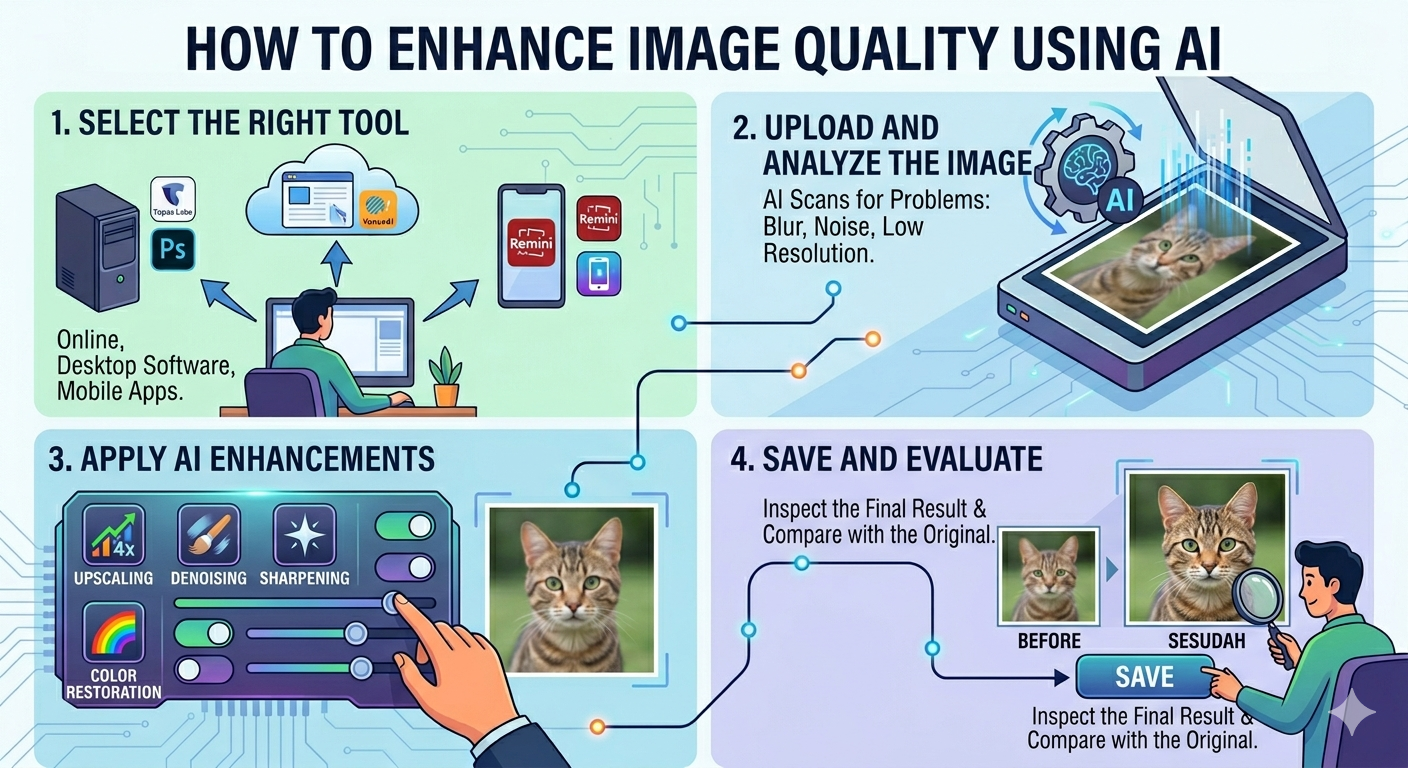
The digital world is awash with stunning visuals, and the tools we use to create them are constantly evolving. Right now, every creative is asking the same question: Can AI photo enhancers truly replace Photoshop? Or is it just another flash in the pan?
Let’s dive into a side-by-side comparison to help you choose the right tool for your needs.
Quick Verdict: It Depends
There’s no simple answer. The best choice depends entirely on your specific needs and skill level. Photoshop remains the king for precision and complex editing. But, AI photo enhancers offer speed and simplicity that are hard to ignore, especially for certain tasks. Think of it this way: Photoshop is a surgeon’s scalpel, while AI is a high-powered, targeted laser. Both are effective, but they excel in different situations.
| Photoshop: What It Does Best |
Photoshop isn’t just software; it’s an industry standard. Here’s why it’s still a powerhouse:
- Precision Manual Control: Pixel-perfect edits are Photoshop’s bread and butter.
- Complex Compositing: Combine multiple images seamlessly.
- Layer-Based Non-Destructive Editing: Experiment without ruining your original image.
- Professional Industry Standard: Used in studios and agencies worldwide. If you want to collaborate, Photoshop is a baseline skill.
- Vast Plugin Ecosystem: Extend its functionality with countless plugins.
| AI Photo Enhancers: What They Do Best |
AI photo enhancers have stormed onto the scene, offering compelling alternatives. Here’s where they shine:
- Speed (Seconds vs. Hours): Get results almost instantly.
- No Learning Curve: Intuitive interfaces anyone can use.
- Automatic Enhancement: AI algorithms handle the heavy lifting. For many common use-cases, this is all you need.
- Accessibility and Cost: Often cheaper than Photoshop (or even free for basic use).
- Specific Tasks Done Better than Manual Editing: Noise reduction and upscaling are often better with AI, leveraging advanced algorithms impossible to replicate manually.
| Head-to-Head Comparison: AI vs. Photoshop |
Let’s break down specific tasks and see which tool comes out on top.
Background Removal
- Winner: AI Enhancer
- Why: AI tools like Canva AI offer incredibly quick and accurate background removal with a single click. Photoshop requires manual selection and refinement, which can be time-consuming.
- Notes: For complex backgrounds with intricate details, Photoshop may still offer slightly better control but, honestly, the AI is more than ‘good enough’ for most use cases now.
Noise Reduction
- Winner: AI Enhancer
- Why: AI-powered noise reduction algorithms, like those in Topaz Photo AI, are amazing. They can remove noise while preserving details in a way that traditional Photoshop techniques struggle to match.
- Notes: Photoshop’s noise reduction is decent, but AI has a clear edge here.
Upscaling/Resolution Increase
- Winner: AI Enhancer
- Why: Again, AI algorithms excel at intelligently adding detail when upscaling images. The results are often sharper and more natural than Photoshop’s standard resampling methods.
- Notes: Consider using tools like Let’s Enhance for this task, which are purpose built for upscaling images using AI.
Color Correction
- Winner: Photoshop
- Why: Photoshop offers granular control over color channels, allowing for precise and nuanced adjustments. While AI tools can automate basic color correction, they often lack the finesse required for professional-level work.
- Notes: For simple adjustments, AI is fine, but Photoshop is still the champion here.
Portrait Retouching
- Winner: Photoshop (but AI is closing in)
- Why: Photoshop allows for meticulous control over skin smoothing, blemish removal, and other retouching tasks. You can maintain a natural look while perfecting the image. However, AI tools are getting surprisingly good at automated portrait enhancement.
- Notes: The key is subtlety. Over-reliance on AI can lead to unnatural, plastic-looking results. Adobe Firefly is probably the closest competitor here.
Object Removal
- Winner: Photoshop
- Why: Photoshop’s content-aware fill is still the gold standard for seamlessly removing objects from images. While AI tools are improving, they can sometimes produce noticeable artifacts.
- Notes: The more complex the scene, the more Photoshop wins.
Batch Processing
- Winner: AI Enhancer (for specific tasks)
- Why: Some AI tools, like Luminar Neo, offer excellent batch processing capabilities for tasks like noise reduction or upscaling. Photoshop can also batch process, but it often requires more setup.
- Notes: The advantage depends on what you’re batch processing. If it’s a simple task AI wins, anything more complex and Photoshop wins.
Sharpening
- Winner: AI Enhancer
- Why: AI-powered sharpening algorithms can intelligently enhance details without introducing unwanted artifacts. The results are often cleaner and more natural than traditional Photoshop sharpening techniques.
- Notes: Topaz Photo AI is a great example of this.
HDR/Exposure Correction
- Winner: Photoshop
- Why: Photoshop’s Camera Raw filter offers unparalleled control over exposure, highlights, shadows, and other tonal adjustments. You can fine-tune the image to achieve the desired look.
- Notes: Again, for fine tuning Photoshop wins, for quick, acceptable results AI wins.
Speed of Completion
- Winner: AI Enhancer
- Why: AI tools automate many tasks, drastically reducing the time required to edit an image. What might take hours in Photoshop can be done in seconds with AI.
- Notes: This is the biggest advantage of AI, and it’s hard to overstate.
| Comparison Table: AI Photo Enhancer vs. Photoshop |
| Task | Photoshop | AI Enhancer | Winner | Notes |
| Background Removal | Manual selection, time-consuming | One-click, fast and accurate | AI Enhancer | Photoshop better for very complex backgrounds |
| Noise Reduction | Decent, but can lose details | AI algorithms preserve details | AI Enhancer | Topaz Photo AI is excellent |
| Upscaling/Resolution Increase | Standard resampling methods | Intelligently adds detail | AI Enhancer | Let’s Enhance is a good option |
| Color Correction | Granular control | Automated, lacks finesse | Photoshop | AI fine for basic adjustments |
| Portrait Retouching | Meticulous control | Automated, can look unnatural | Photoshop | Adobe Firefly is closest competitor |
| Object Removal | Content-aware fill is the gold standard | Improving, but can produce artifacts | Photoshop | More complex the scene, more Photoshop wins |
| Batch Processing | Requires more setup | Excellent for specific tasks | AI Enhancer (situationally) | Depends on the task |
| Sharpening | Can introduce artifacts | Intelligently enhances details | AI Enhancer | Topaz Photo AI is a good example |
| HDR/Exposure Correction | Unparalleled control | Quick, acceptable results | Photoshop | Photoshop wins for fine tuning |
| Speed of Completion | Time-consuming | Drastically reduced time | AI Enhancer | Biggest advantage of AI |
| Cost Comparison: What Will It Cost You? |
Let’s talk money. Photoshop’s subscription model can be a barrier for some.
- Photoshop: Around $20+/month for the photography plan. Steep, but consider the access to a huge suite of tools and regular updates.
- Top AI Tools: Range from free (with limitations) to around $15/month. Some offer one-time purchase options. This can be very appealing if you only need a few specific functions.
The value proposition depends on your use case. If you’re a professional who uses Photoshop daily, it’s easily worth the cost. But, if you only need occasional edits, an AI tool might be more cost-effective.
| Learning Curve Comparison: How Much Time Will You Invest? |
Time is money, and the learning curve is a significant factor.
- Photoshop: Hours/days to learn the basics, years to master. The sheer depth of the software can be overwhelming.
- AI Tools: Minutes to get results. The interfaces are designed for simplicity and ease of use. You’ll spend less time learning and more time creating.
| Who Should Use Photoshop? |
Photoshop is the right tool for you if you fit into these categories:
- Professional Designers and Retouchers: Pixel-level control is essential for your work.
- VFX and Compositing Artists: Complex compositing requires Photoshop’s layering capabilities.
- Those Needing Pixel-Level Control: When precision is paramount, Photoshop is the only choice.
| Who Should Use AI Enhancers? |
AI enhancers are a great choice if you’re:
- Content Creators and Bloggers: Need fast, easy enhancements for social media and website images.
- E-commerce Sellers: Want to quickly improve product photos.
- Beginners and Non-Designers: Intimidated by Photoshop’s complexity.
- Anyone Needing Fast, Automated Results: Speed is a priority.
| Can You Use Both? The Hybrid Workflow |
Absolutely! The best approach might be a hybrid workflow. Use AI tools for quick enhancements and then bring the images into Photoshop for final tweaks and complex edits. This way, you can leverage the strengths of both.
For example, you could use Topaz Photo AI to reduce noise and then import the image into Photoshop for color correction and object removal.
| FAQ: Your Questions Answered |
Let’s tackle some common questions.
Is AI photo editing as good as Photoshop?
Not always, but it’s getting closer. For specific tasks like noise reduction and upscaling, AI can even surpass Photoshop. However, Photoshop still offers more control and precision for complex edits.
Can AI replace Photoshop completely?
Not yet. While AI is rapidly evolving, it still lacks the nuanced control and versatility of Photoshop. Professional designers and retouchers will likely continue to rely on Photoshop for the foreseeable future. That said, for many ‘non-designers’ AI tools can completely replace Photoshop.
Which is better for beginners?
AI enhancers are far better for beginners. The intuitive interfaces and automated features make it easy to get impressive results without any prior experience.
Is Photoshop worth $20/month?
If you use it regularly for professional or complex editing tasks, then yes. If you only need occasional edits, a cheaper AI tool might be a better value.
What AI tools come closest to Photoshop?
Adobe Firefly is the closest in terms of features and integration with the Adobe ecosystem. Luminar Neo also offers a wide range of AI-powered editing tools.
| Conclusion: The Final Verdict |
So, AI photo enhancer vs. Photoshop: which is better? The answer, as you now know, is: it depends. If you need ultimate control and precision, Photoshop is still the undisputed king. But if you’re looking for speed, simplicity, and impressive results with minimal effort, AI photo enhancers are a fantastic alternative.
Choose Photoshop if:
- You’re a professional designer or retoucher.
- You need pixel-level control.
- You work on complex compositing projects.
Choose AI Enhancers if:
- You’re a content creator or blogger.
- You need to quickly enhance images for social media or e-commerce.
- You’re a beginner and intimidated by Photoshop.
Or, better yet, embrace a hybrid workflow and use both to unlock their full potential.