Do you have a box of old family photos tucked away? Faded images, torn edges, and scratches obscuring precious memories? Don’t let time steal those moments. AI tools are here to help you breathe new life into your old photos, allowing you to share them with future generations.
With AI photo restoration, you can easily bring back those once lost memories that you can cherish for many years to come.
| Quick Solutions: Top AI Photo Restoration Tools |
If you’re eager to dive in, here are a few of our top picks for AI-powered photo restoration:
- Remini: Excellent for facial detail enhancement and overall clarity.
- MyHeritage Photo Enhancer: Great for sharpening blurry faces and revealing hidden details.
- Colorize.cc: Quick and easy AI colorization of black and white photos.
| What Can AI Photo Restoration Fix? |
AI photo restoration tools are capable of addressing a wide range of common problems found in old photographs. These tools make bringing memories back to life easy. Here’s a breakdown of what they can often fix:
- Fading and Color Loss: Revives faded colors and restores vibrancy.
- Scratches and Tears: Removes or minimizes visible damage.
- Dust and Spots: Cleans up imperfections caused by age and storage.
- Blurriness in Old Prints: Sharpens blurry images, especially faces.
- Black & White to Color Conversion: Adds realistic color to monochrome photos.
- Missing Facial Details: Enhance facial features, especially if blurry or damaged.
| Top AI Restoration Tools: A Detailed Look |
Let’s explore some of the best AI tools available for restoring your treasured photos. Each tool has its strengths and weaknesses, so we’ll cover everything to allow you to choose the one best suited to your needs.
- Restoration Specialty: General Enhancement and Facial Detail
- Best For: Enhancing portraits and group photos where facial clarity is crucial.
Restoration Capabilities:
- ✅ Sharpening blurry faces
- ✅ Overall image clarity improvement
- ✅ Reducing noise and grain
Key Features:
- User-friendly mobile app.
- Quick processing times.
- Before/after comparison slider.
- Subscription-based model with limited free use.
Pros:
- Extremely easy to use, even for beginners.
- Excellent results on faces.
- Available on iOS and Android.
Cons:
- Free version has usage limits.
- Results can sometimes look artificial.
- Not ideal for heavily damaged photos.
Pricing:
- Free trial with limited enhancements.
- Subscription plans vary.
Restoration Verdict: Remini is a great starting point for quick and easy enhancements, particularly for improving facial details. However, more damaged photos may require a different tool.
- Restoration Specialty: Facial Enhancement and Detail Recovery
- Best For: Revealing hidden details in old portraits and family photos.
Restoration Capabilities:
- ✅ Sharpening blurry faces.
- ✅ Color restoration.
- ✅ Enhancing overall image resolution.
Key Features:
- Dedicated facial enhancement technology.
- Part of a larger genealogy platform.
- Easy to use web interface.
- Animation capabilities available separately.
Pros:
- Specializes in facial detail recovery.
- Integrates with MyHeritage’s genealogy tools.
- Free to enhance a limited number of photos.
Cons:
- Requires a MyHeritage account.
- Not as effective for non-facial elements.
- Subscription required for unlimited use.
Pricing:
- Free for a limited number of photos.
- MyHeritage subscription required for full access.
Restoration Verdict: If you’re focused on bringing faces back to life in your old photos, MyHeritage Photo Enhancer is an excellent choice.
- Restoration Specialty: Black and White Photo Colorization
- Best For: Quickly adding color to black and white photos.
Restoration Capabilities:
- ✅ Automatic colorization of black and white images.
- ✅ Simple, user-friendly interface.
Key Features:
- Fully automatic process.
- No account required.
- Fast colorization times.
- Free to use with limitations.
Pros:
- Incredibly easy to use.
- No sign-up or software download needed.
- Surprisingly good results for a free tool.
Cons:
- Limited control over color choices.
- Results can sometimes be inconsistent.
- May not be suitable for professional use.
Pricing:
- Free to use with limitations.
- Paid options for higher resolution and unlimited use.
Restoration Verdict: Colorize.cc is a great option if you want to quickly colorize black and white photos with minimal effort. Just don’t expect perfection.
- Restoration Specialty: Comprehensive Restoration with Advanced Control
- Best For: Users who want full control over the restoration process and are comfortable with Photoshop.
Restoration Capabilities:
- ✅ Photo Restoration Filter (Beta) – can address scratches, enhance faces, and boost details.
- ✅ Smart Portrait – adjust facial features like age, expression, and lighting.
- ✅ Colorize – Powerful colorization tool.
Key Features:
- Part of the industry-standard Photoshop software.
- Offers a wide range of restoration and enhancement tools.
- Non-destructive editing.
Pros:
- Unmatched control and precision.
- Access to a vast ecosystem of Photoshop tools.
- Professional-grade results.
Cons:
- Steep learning curve.
- Requires a paid Photoshop subscription.
- Can be resource-intensive.
Pricing:
- Adobe Photoshop subscription required.
Restoration Verdict: If you’re a Photoshop user or willing to learn, Neural Filters offer incredible power and control for restoring your old photos. These tools are a powerhouse if used correctly.
- Restoration Specialty: AI-Powered Colorization with Palette Customization
- Best For: Achieving nuanced and tailored colorization results, catering to specific preferences.
Restoration Capabilities:
- ✅ AI-driven black and white image colorization
- ✅ Manual color palette customization
Key Features:
- AI-powered, offering impressive colorization quality.
- Offers manual control, letting you select specific color palettes.
- Simplifies the process by enabling personalized color adjustments for a realistic effect.
Pros:
- AI-driven automatic colorization, ensures high-quality results.
- Offers manual color palette control, enabling personalized adjustments.
- Suitable for users seeking tailored and refined colorization outcomes.
Cons:
- Lacks comprehensive photo restoration capabilities.
- Focuses solely on colorization, neglecting damage and clarity issues.
Pricing:
- Free – limited resolution and features
- Paid – Unlock full resolution and remove watermarks
Restoration Verdict: Palette.fm is tailor-made for users seeking top-tier colorization with customized control, despite its limitations in addressing broader restoration needs.
- Restoration Specialty: All-in-One Restoration with AI-Powered Tools
- Best For: Conveniently repairing, enhancing, and colorizing old photos in one go.
Restoration Capabilities:
- ✅ Automated scratch and blemish removal
- ✅ AI-driven image enhancement
- ✅ Black and white photo colorization
Key Features:
- Provides AI-driven automation for restoration tasks.
- Enhances image quality with sharpening and noise reduction.
- Offers colorization to breathe new life into monochrome images.
Pros:
- Streamlines restoration with automation.
- Enhances image quality, sharpness, and reduces noise effectively.
- Provides colorization for vivid, lifelike results.
Cons:
- Limited control over specific settings.
- May require a subscription for optimal performance.
Pricing:
- Free – limited previews and features
- Subscription – Full access and batch processing
Restoration Verdict: VanceAI Photo Restorer offers a comprehensive solution for effortless restoration, suitable for quick enhancements, colorization, and scratch removal.
- Restoration Specialty: Versatile Restoration with User-Friendly Interface
- Best For: Achieving balanced results with straightforward restoration and enhancement features.
Restoration Capabilities:
- ✅ Scratch and blemish removal
- ✅ Image enhancement and sharpening
- ✅ Color correction and adjustment
Key Features:
- Intuitive interface for ease of use
- Offers a range of restoration tools
- Enhances image quality with color correction
Pros:
- User-friendly for beginners and casual users
- Provides versatile restoration options
- Enhances image quality effectively
Cons:
- May lack advanced features for demanding restoration tasks
- Some features may require a paid subscription
Pricing:
- Free – limited access and ads
- Pro – Unlock all features and remove watermarks
Restoration Verdict: Fotor Photo Restore offers a well-rounded restoration experience with its user-friendly interface and versatile features, suitable for everyday restoration needs.
| Restoration Capability Table |
| Tool | Scratch Repair | Color Restore | Colorization | Face Enhancement | Free Plan | Price |
| Remini | ❌ | ✅ | ❌ | ✅ | ✅ (Limited) | Subscription |
| MyHeritage | ❌ | ✅ | ❌ | ✅ | ✅ (Limited) | Subscription |
| Colorize.cc | ❌ | ❌ | ✅ | ❌ | ✅ (Limited) | Paid Options |
| Adobe Photoshop Neural Filters | ✅ | ✅ | ✅ | ✅ | ❌ | Subscription |
| Palette.fm | ❌ | ❌ | ✅ | ❌ | ✅ (Limited) | Paid Options |
| VanceAI | ✅ | ✅ | ✅ | ✅ | ✅ (Limited) | Subscription |
| Fotor | ✅ | ✅ | ✅ | ✅ | ✅ (Limited) | Subscription |
| Step-by-Step: Restoring an Old Photo with Remini |
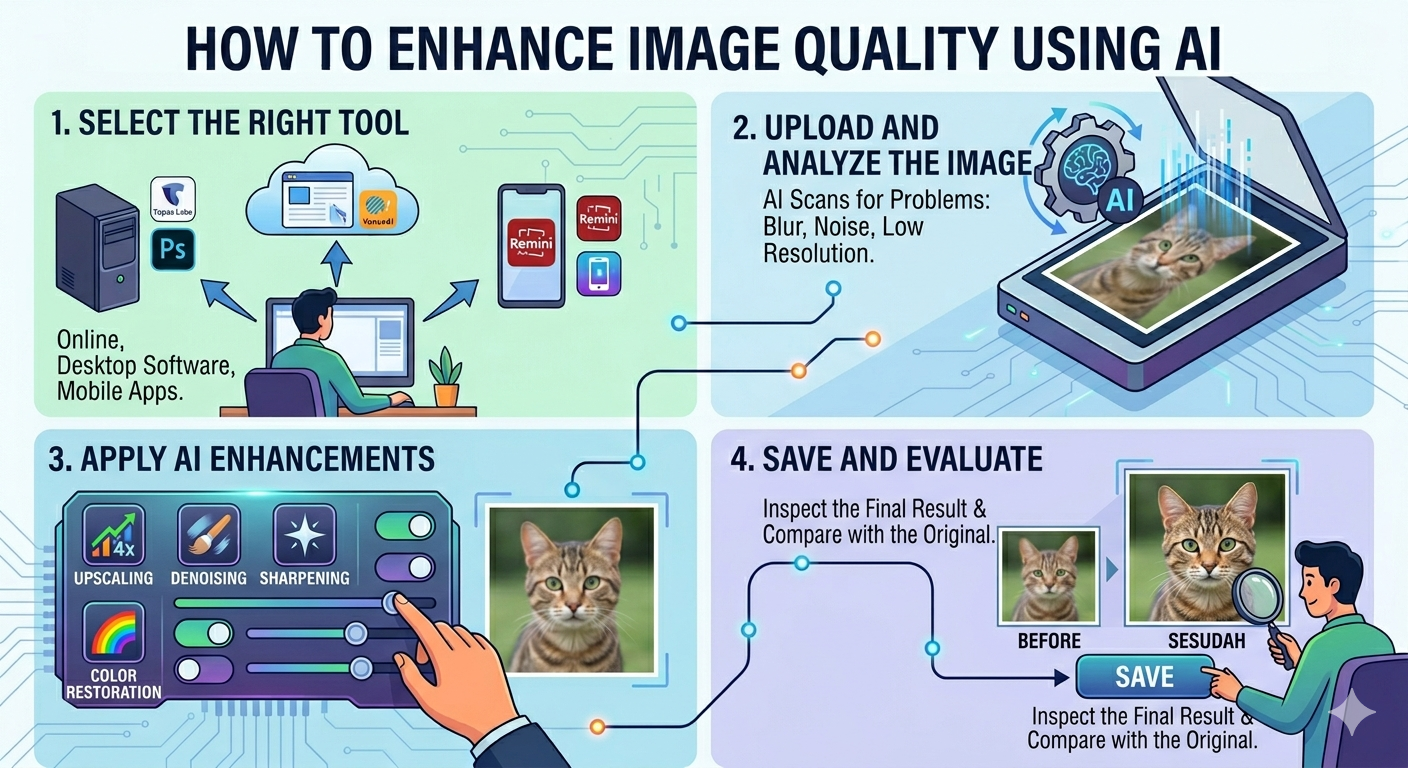
Let’s walk through the process of restoring an old photo using Remini. It’s a user-friendly option, especially for enhancing faces.
Pro Tip: Scan your old photo for the best results. More on that later!
- Download and Install: Download the Remini app on your smartphone (iOS or Android) and install it.
- Upload Your Photo: Open the app and tap the ‘Enhance’ button. Select the photo you want to restore from your gallery.
- Let AI Do Its Magic: Remini will automatically analyze your photo and apply its AI-powered enhancements. This may take a few seconds.
- Review and Save: Once the processing is complete, you’ll see a before/after comparison. If you’re happy with the results, tap the ‘Save’ button to download the enhanced photo.
| Scanning Old Photos for Best Results |
Before you start restoring your photos with AI, it’s crucial to have high-quality digital versions. Scanning is the best way to achieve this.
- DPI Recommendations: Aim for a minimum of 600 DPI (dots per inch) for optimal results. This captures enough detail for effective restoration.
- Scanner vs. Phone Scanning Apps: While phone scanning apps are convenient, a dedicated scanner generally produces better quality images.
- File Format for Scanning: TIFF (Tagged Image File Format) is preferred over JPG for archiving as it’s a lossless format, preserving all the original details. JPG uses compression, which can degrade image quality over time.
| Black and White Colorization |
Adding color to black and white photos can bring them to life in incredible ways. While fully automatic colorization is possible, realistic expectations are key.
- Best Tools: Colorize.cc, MyHeritage In Color, and Adobe Photoshop Neural Filters are good options.
- How to Guide: Some tools offer manual color adjustments. Start by choosing a base color palette for different elements (skin tones, clothing, etc.).
- Realistic Expectations: AI colorization is not perfect. Colors may not always be accurate, especially for objects where the AI has no context.
| When to Hire a Professional Restorer |
While AI tools are powerful, they have limitations. Severely damaged photos with missing pieces or extreme fading may require the expertise of a professional photo restorer.
Consider hiring a professional if:
- Your photos have significant damage.
- You need archival-quality restoration.
- You want precise control over every aspect of the process.
| FAQ: AI Photo Restoration |
Can AI restore severely damaged photos?
AI can help, but severely damaged photos might require professional restoration for the best results.
What’s the best free photo restoration tool?
Remini and MyHeritage offer free options with limitations. Colorize.cc is great for colorization.
Can AI colorize black and white photos accurately?
AI colorization is good, but not always perfect. Results may vary depending on the image.
How do I scan old photos before restoring them?
Scan at 600 DPI or higher and save as TIFF for optimal quality.
Can AI restore faces in old photos?
Yes! Tools like Remini and MyHeritage are excellent for enhancing facial details.
| Conclusion: Embrace the Future of Photo Restoration |
AI tools have revolutionized the way we restore old photos. These new techniques can bring faded images back to life. Sharing those old memories with your family has never been easier.
For an all-around excellent option for bringing faces back to life, we recommend Remini. So, give AI photo restoration a try and rediscover the joy of your treasured memories. With just a few clicks, you can preserve your family’s history for generations to come.